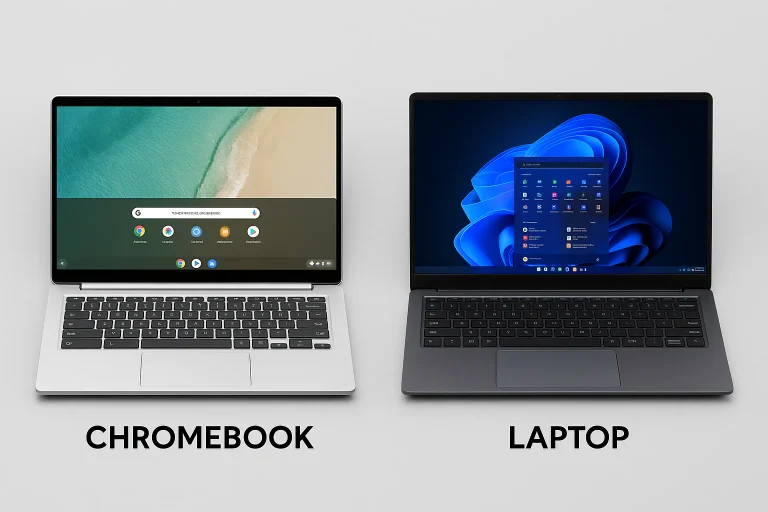
Buying a new laptop often comes down to choosing between a Chromebook and a Windows laptop. While both may look similar on the outside, they are designed with different users in mind.
Chromebooks focus on simplicity, affordability and cloud-based computing, making them ideal for everyday online tasks. Windows laptops, meanwhile, offer greater flexibility, stronger hardware options and support for a much wider range of software, making them suitable for everything from office work to gaming and professional content creation.
Here’s a detailed comparison to help you decide which one best fits your needs.
Chromebook vs Windows Laptop: What’s the Difference?
The biggest distinction between the two lies in their operating systems.
Chromebooks run Google’s ChromeOS, an operating system built around the Chrome browser and Google’s cloud ecosystem, including services such as Google Drive, Gmail and Google Docs. Most tasks are designed to be performed online, although many apps now also support offline functionality.
Windows laptops run Microsoft Windows, one of the world’s most widely used desktop operating systems. It supports an extensive range of desktop software, professional applications, games and productivity tools.
Software Compatibility
One of the biggest advantages of Windows laptops is software support.
Chromebooks are primarily designed to run:
- Web applications
- Android apps from the Google Play Store
- Linux applications (on supported models)
Windows laptops, on the other hand, support virtually every major desktop application, including software used for:
- Programming
- Video editing
- Graphic design
- Engineering
- Business and enterprise workflows
- Gaming
For users who rely on specialised applications, Windows remains the more versatile platform.
Performance and Everyday Usage
Chromebooks are built for everyday computing rather than raw performance. They are well suited for tasks such as:
- Web browsing
- Online classes
- Video conferencing
- Streaming movies and shows
- Document editing
Their lightweight operating system also contributes to excellent battery life and fast boot times.
Windows laptops cater to a much wider audience. The range includes affordable entry-level devices for everyday use as well as powerful machines capable of handling demanding workloads, including gaming, 3D rendering and professional creative applications.
Chromebook vs Windows Laptop: Which Is Better for Different Users?
There is no one-size-fits-all answer. The right choice depends entirely on how you plan to use your laptop.
Choose a Chromebook if you are:
- A student
- A first-time laptop buyer
- A casual user
- Someone who primarily works online
- Looking for long battery life at an affordable price
Chromebooks comfortably handle browsing, online learning, video calls, entertainment and cloud-based productivity.
Choose a Windows Laptop if you are:
- A working professional
- A programmer or software developer
- A graphic designer or video editor
- An engineer
- A gamer
- A business user who relies on Windows-specific software
Windows offers significantly greater flexibility and supports virtually every major desktop application available.
What About Office Users?
For office work, the choice largely depends on the software your organisation uses.
If your workflow is browser-based and revolves around cloud services such as Google Workspace, a Chromebook may be more than sufficient.
However, if your work depends on Windows-exclusive software or advanced features of Microsoft Office, a Windows laptop is the better option.
Best Chromebook Options in India
If you’re considering a Chromebook, some popular choices include:
- Asus Chromebook CX14
- Lenovo Chromebook Duet 11
- HP Chromebook X360
These models offer a good balance of affordability, portability and battery life for students and everyday users.
Best Windows Laptop Options in India
For Windows users, several laptops cater to different budgets and needs:
- Asus Vivobook 16 – Suitable for everyday productivity and office work.
- Lenovo IdeaPad Slim 3 – A solid all-round laptop for students and professionals.
- HP Victus 15 – Designed for gaming and heavier workloads.
- Lenovo ThinkPad X1 Carbon Gen 13 – A premium business laptop with excellent performance and portability.
Chromebook vs Windows Laptop: Which Should You Buy?
If your daily computing revolves around web browsing, online classes, email, streaming and cloud-based applications, a Chromebook offers excellent value. It is generally more affordable, easy to use and delivers impressive battery life.
However, if you need greater computing power, wider software compatibility or plan to use professional applications, a Windows laptop remains the better long-term investment.
Ultimately, the best laptop is the one that aligns with your personal requirements. Chromebooks excel in simplicity and cloud-first computing, while Windows laptops provide unmatched versatility, performance and software support for users with more demanding workloads.